What actually happened to Arc
First, the facts, because they are easy to get wrong. In May 2025, The Browser Company announced it would stop building new features for Arc and put its effort into Dia, a new AI-centered browser. In September 2025, Atlassian agreed to acquire The Browser Company for $610 million, and the deal closed that October.
As of mid-2026, Arc is not dead. You can still download it, and it still receives Chromium security updates. But it is in maintenance mode: no new features are planned, no sunset date has been announced, and the team that made it is building something else.
None of that diminishes what Arc achieved. Spaces, the sidebar, the care in every animation: Arc showed that a browser could feel designed rather than default, and it earned a following of people who live in their browser all day. That is exactly the bar any alternative has to clear.
Meet Drift: the rethink, taken further
Drift is a free, open-source spatial browser for macOS. It starts from the same conviction Arc did, that browser chrome deserves rethinking, and then goes further than Arc ever went: it removes tabs entirely.
In Drift there is no tab strip. Every page is a live card on an infinite, zoomable canvas. Zoom out and your session becomes a constellation of live page thumbnails you can survey at a glance. Zoom in and every card is a full browser page: logins, video, and web apps all work, because every card is a real Chromium page. If the idea is new to you, the explainer on what a spatial browser is covers it in depth.
Follow a link that would normally open a new tab, and Drift spawns a child card with a visible trail back to its parent. Your path through the web becomes a map you can see, not a mental model you have to maintain. You can draw trails yourself by dragging between cards, remove one with a double-click, and export any trail as a Markdown reading list.
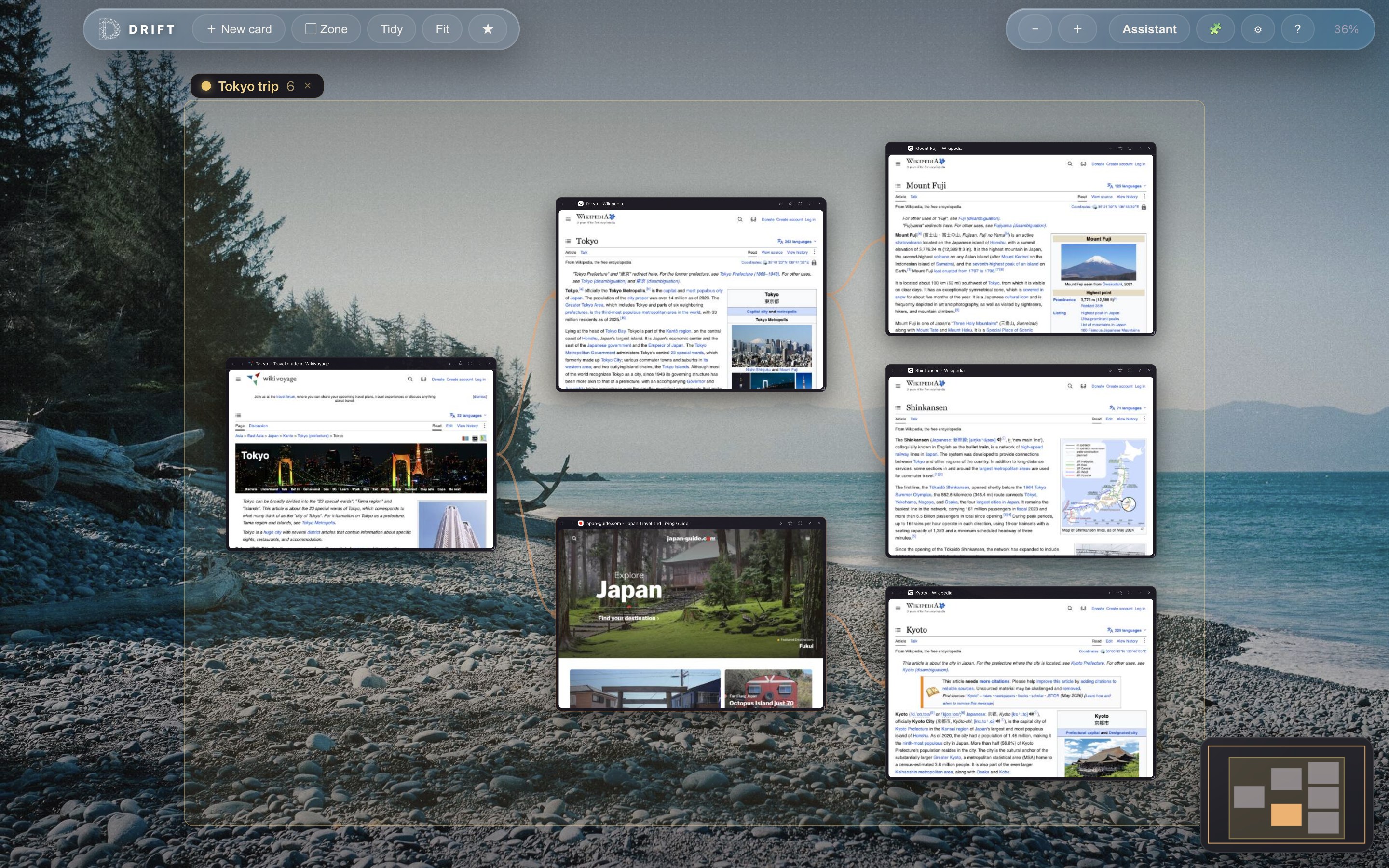
Planning a trip in Drift: every page is a live card, and the trails show how the plan came together.
What Arc users will recognize
Coming from Arc, plenty of Drift will feel like home:
- Zones are the spatial cousin of Spaces. Name a region of the canvas, say "Trip planning" or "Biology", give it a color, and move the whole thing as one unit.
- Focus when you need it. Focus a single card, pin two side by side, or go full screen; Esc floats you back out to the canvas. Cmd+0 fits your whole session on screen, and Cmd+F highlights search matches right on the canvas.
- Chrome extensions work. Install ad blockers and more straight from the Chrome Web Store; their icons sit in the toolbar.
- Easy to move in. Star pages, sort them into folders, and import your bookmarks from Chrome, Brave, or Firefox.
- It cares how it looks. Rotating photo backdrops, solid colors, or your own image from Settings.
Privacy without a login screen
One place Drift deliberately parts ways with Arc: there are no accounts and no sync servers. Drift keeps no browsing-history log at all. The visible trails on your canvas are the only record of where you have been, and you can delete any of them with a double-click. Close a card by accident and a right-click brings it back.
The trade-off is real. Because nothing leaves your machine, there is no cross-device sync. If syncing between Macs matters more to you than local-only privacy, weigh that honestly before switching.
Drift vs Arc at a glance
As of July 2026:
| Drift | Arc | |
|---|---|---|
| Engine | Chromium (via Electron) | Chromium |
| Tabs model | No tabs: live cards on an infinite zoomable canvas, connected by trails | Vertical tabs in a sidebar, organized into Spaces |
| Open source | Yes, GPL-3.0, full source on GitHub | No |
| Price | Free | Free |
| Platforms | macOS (Apple Silicon and Intel); Windows coming soon | macOS and Windows |
| Privacy & sync | No accounts, no sync servers, no browsing-history log; everything stays on your machine | Account-based, with sync across devices |
| Status | Actively developed; early software at v0.2.5 | Maintenance mode: security updates only, no new features |
The honest fine print
Drift is young software, and you should know that before you switch. It is built and maintained by one indie developer rather than a venture-backed team of dozens. It runs on macOS only for now, on both Apple Silicon and Intel, with a Windows build coming soon.
The macOS builds are signed and notarized by Apple, so they install with a normal double-click. The entire source is on GitHub under GPL-3.0 if you would rather read the code first.
If you want polish measured in years, Drift is not there yet. If you want to be early to an idea the way Arc's first users were early in 2022, this is what that looks like.
Other Arc alternatives worth considering
Drift will not be right for everyone, and there are other credible places for Arc users to land as of 2026:
- Dia is The Browser Company's own successor, now under Atlassian: a Chromium browser for Mac built around an AI assistant in the address bar. The natural choice if what you loved most was the team.
- Zen Browser is open source, Firefox-based, and community-funded, with an Arc-like sidebar feel and an active release cadence.
- Vivaldi is the long-running power-user browser on Chromium, endlessly customizable and actively developed for Windows, macOS, and Linux.
- SigmaOS is a Mac-only WebKit browser organized around workspaces, with a free personal tier.
All of them keep the tab in one form or another. Drift is the one that asks what browsing looks like without tabs at all.