You know the moment. You glance up at the top of your browser and there are forty tabs, each squeezed down to a favicon and three letters. One of them is the flight you almost booked. One is the article you actually meant to read. Somewhere in there is the docs page you need right now, and the only way to find it is to click through the row one sliver at a time, like flipping through unlabeled folders in a filing cabinet.
The usual advice is to be more disciplined: close things, use fewer tabs, install yet another tab manager. But too many tabs open is not a character flaw. It is what happens when a good interface is pushed decades past what it was designed for. The tab strip was invented for a handful of pages. Modern browsing means research threads, half-read articles, three web apps, and a shopping comparison, all at once. The container did not grow with the job.
Why the tab strip fails
Tabs fail for structural reasons, and it helps to name them, because each one points at what a real alternative has to do instead.
- It is a fixed row. The strip is one dimension wide and never gets any bigger. Every page you open competes for the same strip of pixels, so the more you browse, the less you can see.
- The targets shrink. At ten tabs you can read titles. At twenty you get favicons. At forty you get identical slivers, and finding anything means clicking through them one by one.
- There is no structure. Tab order is just the order you opened things in. The flight, the recipe, and the work doc sit shoulder to shoulder, and the relationships between pages, which one led to which, are invisible.
- Your path is hidden. The back button only remembers a single line of travel, and the history menu is a flat list of timestamps. The actual shape of your session, the branches you followed and abandoned, is thrown away as you go.
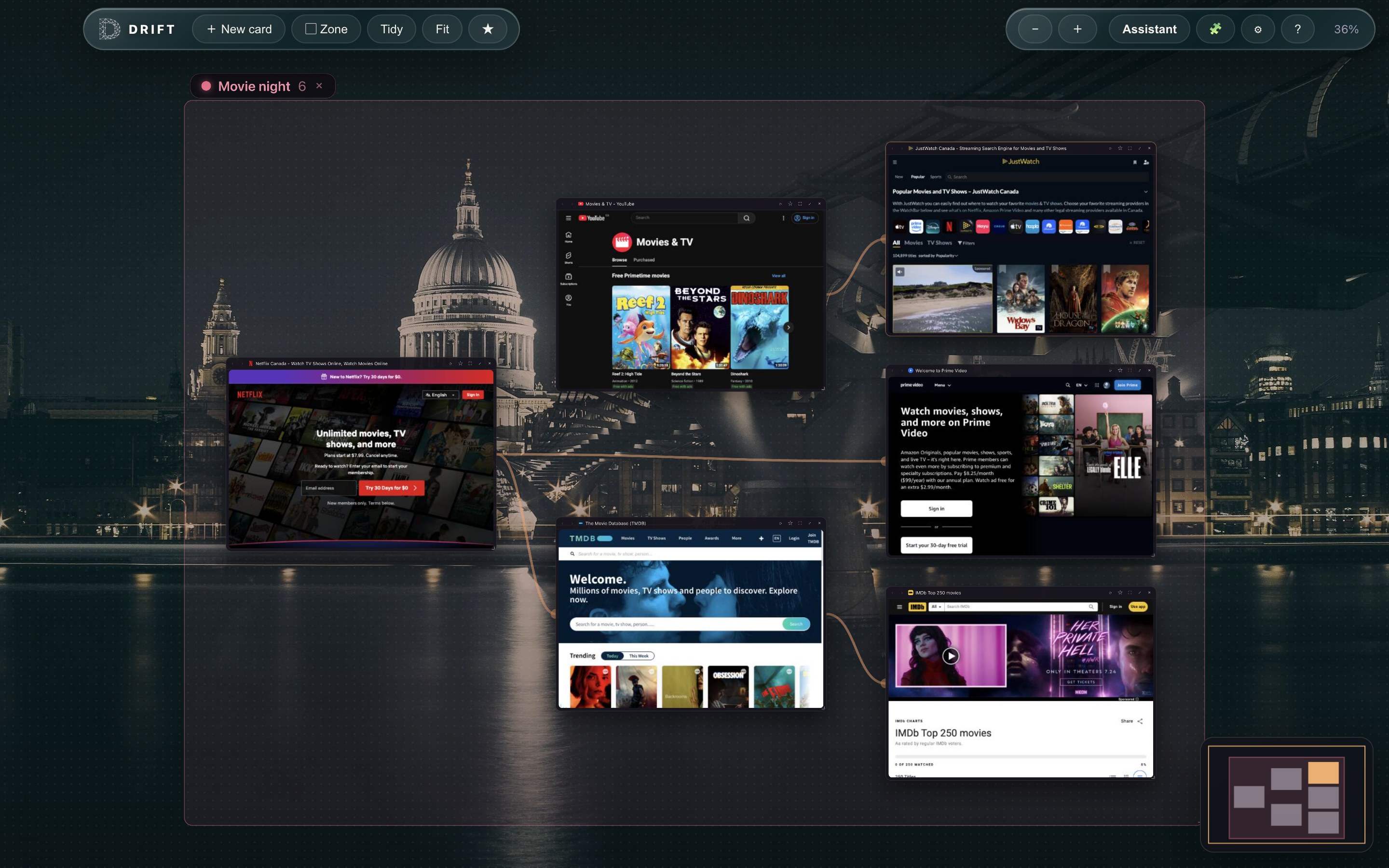
A browser without tabs cannot simply delete the strip and leave a void. It has to replace each of these jobs with something better. That is what Drift, a free and open-source spatial browser for macOS, is built to do. Every page becomes a live card on an infinite, zoomable canvas. Zoom out and your session is a constellation of page thumbnails you can read at a glance. Zoom in and every card is a full Chromium browser page where logins, video, and web apps all work.
What replaces each tab habit
Opening a link
In a tab browser, a link that opens in a new tab lands somewhere to the right and immediately loses its context. In Drift, that link spawns a child card next to the page you came from, with a visible trail connecting the two. Your browsing draws itself as a map: this page led to that one, which branched into three more. You can also draw trails yourself by dragging between any two cards, and remove one with a double-click, so the map ends up reflecting how you actually think, not just how you clicked.
Finding a page again
Instead of squinting at a row of favicons, you zoom out. Cmd+0 fits your whole canvas on screen, and because every card is a live thumbnail, you recognize pages by what they look like and where you left them. That second part matters more than it sounds: spatial memory is the same instinct that lets you find the mug you set down without thinking about it. And when memory is not enough, Cmd+F highlights matching cards right on the canvas.
Grouping work
Tab browsers bolt on tab groups; a canvas gives you actual space. In Drift you name a region of the canvas as a zone, something like "Trip planning" or "Biology", give it a color, and move it around as one unit. Your work-in-progress stops being an undifferentiated row and becomes neighborhoods you can see from above.
Closing versus keeping
The cruelest thing about tabs is the forced binary: keep it open and add to the clutter, or close it and probably lose it. On a canvas, a card you are not using just sits where you left it, out of the way but never out of sight. There is no strip filling up, so there is no pressure to purge. Close something by accident and a right-click reopens it. And since Drift keeps no browsing-history log and runs no sync servers, your canvas stays entirely on your machine.
Reading queues
The classic alternative to browser tabs is the "read later" tab pile, twenty articles you are definitely going to get to. In Drift, a chain of pages is already a trail, and any trail can be exported as a Markdown reading list, titles and links in order, ready to paste into your notes app. Your queue becomes a document instead of a guilt-inducing row of slivers. Star anything worth keeping permanently, file it into bookmark folders, or import your existing bookmarks from Chrome, Brave, or Firefox.
A research session, on the canvas
Here is what this looks like in practice. Say you are planning a week in Portugal. You start a "Lisbon" zone and open a city guide. A link to a neighborhood breakdown spawns a child card; two restaurant pages branch off that. A separate cluster grows for trains to Porto, and you drag a trail from the Porto schedule back to your itinerary doc so the connection is explicit.
Twenty minutes in, you have fifteen pages open, the point where a tab strip becomes unreadable. Here, you press Cmd+0 and see the whole trip at a glance: the guide cluster, the food branch, the transport chain. You focus the itinerary card to write, pin the train schedule beside it, and press Esc to float back out when you are done. Before dinner, you export the restaurant trail as a Markdown list and send it to your travel partner. Nothing was lost, nothing had to be closed, and tomorrow the whole map is exactly where you left it.
Is a browser without tabs practical?
Fair question, because the tab strip is muscle memory for all of us. Drift keeps the parts of the browser that should not change: it is built on Electron with the Chromium engine, so pages render exactly as you expect, and you can install ad blockers and other extensions straight from the Chrome Web Store, with their icons in the toolbar. Focus mode gives you a single full page when you want one, and side-by-side pinning covers the compare-two-things workflow tabs were never good at anyway. If you came here after trying other rethought browsers, see how Drift compares as an Arc alternative.
What changes is the part that was failing: the strip itself. Pages get room, paths stay visible, and "too many tabs" stops being a state your browser can even be in.
Try browsing without tabs
Drift is free, open source under GPL-3.0, and runs on Apple Silicon and Intel Macs, with a Windows build coming soon. No accounts, no sync servers, no browsing log.
Download Drift for macOSSigned and notarized by Apple, so it opens with a normal double-click. Source on GitHub.