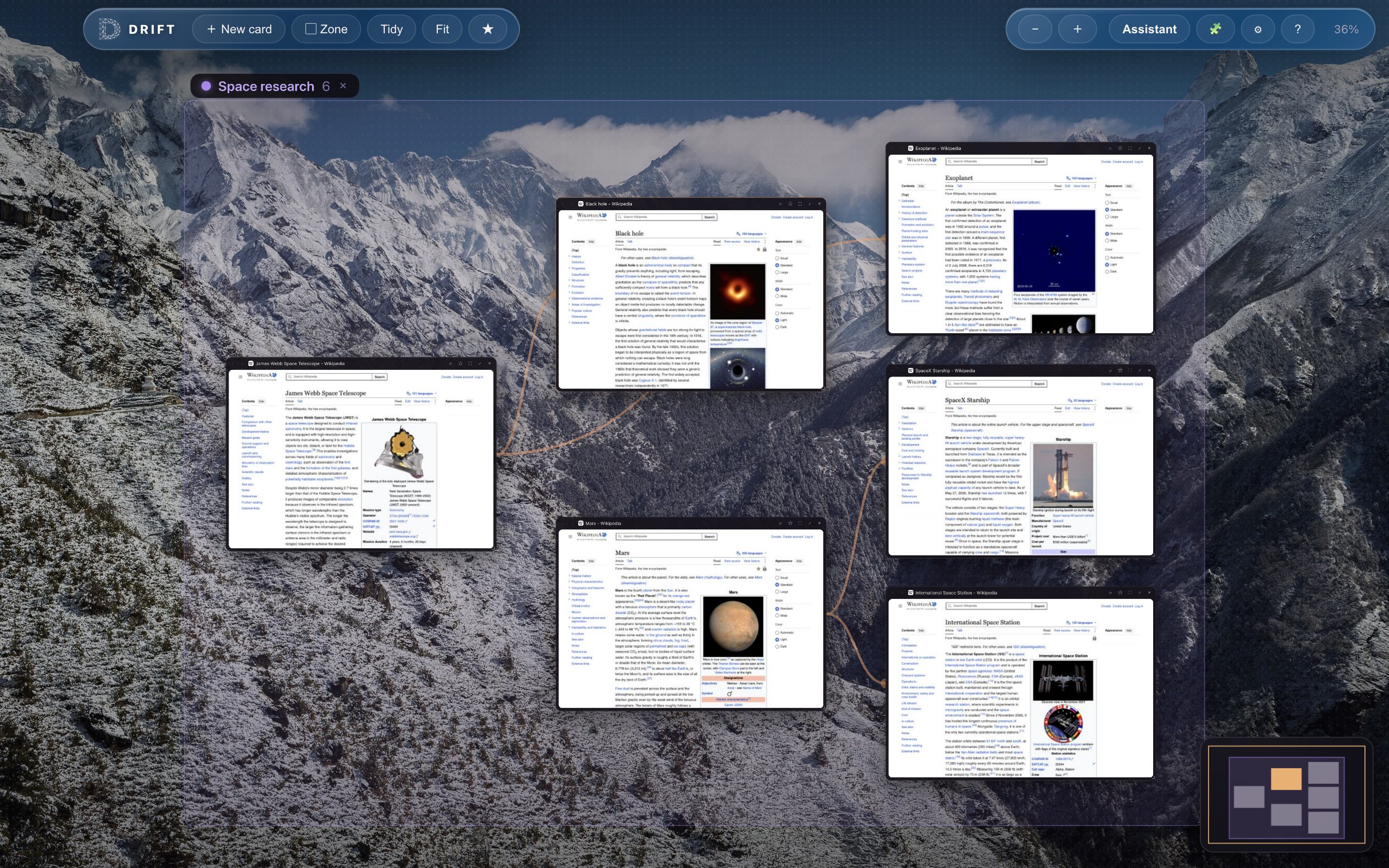
In a spatial browser, every page you open gets a place, not just a position in a queue. Pages sit as cards on an infinite canvas. Related pages sit near each other. The links between them are drawn on screen as visible trails rather than buried in a history menu. Zoom out and the whole session becomes a constellation of live thumbnails you can read at a glance; zoom in and any card is a full, working browser page. Drift is a free, open-source browser built entirely around this idea, and it is the easiest way to feel the difference for yourself.
Where tabs came from
Tabs deserve some credit. When they went mainstream in the early 2000s they were a real improvement: instead of juggling a separate window for every page, you got one tidy strip along the top, borrowed from the paper filing cabinet. For light browsing they still work beautifully. Open your mail, a couple of articles, a video, and a tab strip is exactly the right tool.
The strain shows up when browsing turns into thinking. Somewhere past ten or so open pages, the labels shrink until only favicons remain, and the strip stops telling you anything. Every page is squeezed into an identical little rectangle in a single row, regardless of what it is or why you opened it. The strip is one-dimensional, so it cannot show that these four pages belong to the same question, or that this one led you to that one. That relationship exists, but the browser hides it in a history list you almost never open.
Why space fits the way you think
The case for spatial browsing rests on something you already use every day: spatial memory. You remember where things are with remarkably little effort. You know which shelf the coffee is on, which pocket holds your keys, and roughly where on a messy desk the important letter is sitting. Memory athletes exploit the same faculty when they place facts inside an imagined building and walk through it later.
A tab strip gives spatial memory almost nothing to hold on to, because every tab occupies the same kind of slot and the slots shift as tabs open and close. A canvas gives it everything. When the flight comparison lives at the top left, the hotel research just below it, and the half-read longform piece off on its own to the right, finding a page again is not an act of recall. It is an act of looking. You remember the place, and the place stays put.
A tab asks “which of these identical rectangles was it?” A map asks “where did I leave it?” The second question is the one human brains are built to answer.
Sessions as maps, history as trails
The second thing a spatial browser changes is what happens to your path. In a tab browser, the route you took through the web evaporates as you go. In a spatial browser, it stays visible. When a link in one page would normally open “a new tab,” Drift spawns a child card with a trail drawn back to the parent. An afternoon of reading leaves behind a branching map: here is the question you started with, here are the three directions it split into, here is the dead end and the detour that turned out to matter.
Because the structure is drawn rather than logged, you can also edit it. In Drift you can draw a trail yourself by dragging between two cards, remove one with a double-click, and export any trail as a Markdown reading list to paste into your notes. The map is yours, not a record kept about you.
What that changes in practice
Research
Real research branches. One paper cites three more, a search fans out into a dozen candidates, and the whole point is to compare and connect. On a canvas the branching is the layout: strong sources migrate together, weak ones drift to the edge, and the shape of the reading tells you where you have been thorough and where you have only skimmed. When it is time to write up, the trail is already a reading list.
Planning
Planning a trip means flights, three hotel candidates, a map, a museum's opening hours, and a friend's recommendations, all open at once and all related. In Drift you can select that region of canvas and name it as a zone, such as “Trip planning,” give it a color, and move the whole cluster as one unit. The project stays parked exactly where you left it, laid out and ready, even weeks later.
Writing
Writers live in the space between sources and draft. A spatial browser lets you keep the draft in the middle and the sources arranged around it in view, instead of flipping between tabs by memory. When you need depth rather than breadth, Drift lets you focus one card, pin two side by side to compare, or go full screen; Esc floats you back out to the map.
How Drift puts the idea to work
Drift is a spatial web browser for macOS, free and open source under GPL-3.0. It is built on Electron, so every card runs on the same Chromium engine you already trust: logins, video, and web apps all behave exactly as expected. The spatial layer sits on top:
- Infinite canvas. Pan, pinch, and fly. Cmd+0 fits your whole session on screen, and Cmd+F highlights search matches right on the canvas.
- Visible trails. New pages arrive as child cards linked to their parent. Draw or remove trails yourself, and export any trail as Markdown.
- Zones. Name a region, recolor it, move it as one unit.
- Focus modes. One card, two pinned side by side, or full screen, with Esc to float back out.
- The essentials. Star pages into bookmark folders, import bookmarks from Chrome, Brave, or Firefox, and install Chrome extensions such as ad blockers straight from the Chrome Web Store. Rotating photo backdrops, a solid color, or your own image keep the canvas feeling like yours.
- Privacy by default. No accounts, no sync servers, and no browsing-history log. Everything stays on your machine, and a right-click reopens a card you closed by accident.
If you are wondering what everyday browsing feels like once the strip is gone entirely, we wrote a companion piece on using a browser without tabs. And if you came to spatial browsing by way of Arc and miss a browser willing to rethink its own surface, see how Drift compares as an Arc browser alternative.
The short version
A spatial browser treats your browsing session as a map instead of a list: pages are cards on a zoomable canvas, connections are visible trails, and projects are zones you arrange and return to. It is not a replacement for every quick errand on the web. It is a better fit for the sessions that matter, the ones where you are researching, planning, or writing, and the browser's job is to help you think.