The short version
Drift is a free, open-source browser for macOS that replaces the tab strip with an infinite canvas of live page cards. Every card is a real Chromium page, so your logins, your video, and your web apps all work normally.
Switch on Drift's MCP connector and an AI coding agent — Claude Code, or any other client that speaks the Model Context Protocol — can drive that canvas from your terminal. It can list what you have open, read a page, take a screenshot of one, open new pages, and, with your permission, click and type on them.
The connector is a small HTTP server that runs inside Drift, on
127.0.0.1, protected by a token. It is off until you switch it on.
Why a browser MCP is different from a headless one
Most browser-automation MCP servers launch their own browser. It starts empty: logged out, no cookies, no extensions, no session. Ask it about your analytics dashboard and it gets a sign-in wall. Ask it about a page behind SSO and it gets nothing at all.
Drift's connector does not launch anything. It hands the agent the browser you are already using. That difference shows up immediately:
- Signed-in pages just work. The agent reads your dashboard, your inbox, your admin panel — because it is reading your session, not a fresh anonymous one.
- It sees the rendered page, not the raw URL. Single-page apps, content behind a click, anything drawn by JavaScript after load: it is all there, because the page has already finished rendering in front of you.
- You watch it happen. When the agent acts on a card, Drift brings that card front and centre. You are not reading a log of what a hidden browser claims it did.
- Shared context, both directions. The pages you gathered while researching are the agent's context. The pages it opens land on your canvas, connected by trails.
Setting it up
You need Drift and Claude Code. Two minutes, start to finish.
- In Drift, open the assistant dock, then the Connections screen (the gear icon).
- Find the Claude Code (MCP) row and press Enable. Drift generates a token and starts listening on port 8787.
- Press Copy. Drift puts the whole command on your clipboard, token and all.
- Paste it into your terminal:
claude mcp add --transport http drift http://127.0.0.1:8787/mcp --header "Authorization: Bearer <your token>"
Check it with claude mcp list. You are looking for
drift: ✔ Connected. From then on, Claude Code can see your canvas in any
session started from that project.
The token is shown masked in Drift so it does not leak on a screenshare, and you can rotate it at any time from the same row. Disabling the connector stops the server immediately.
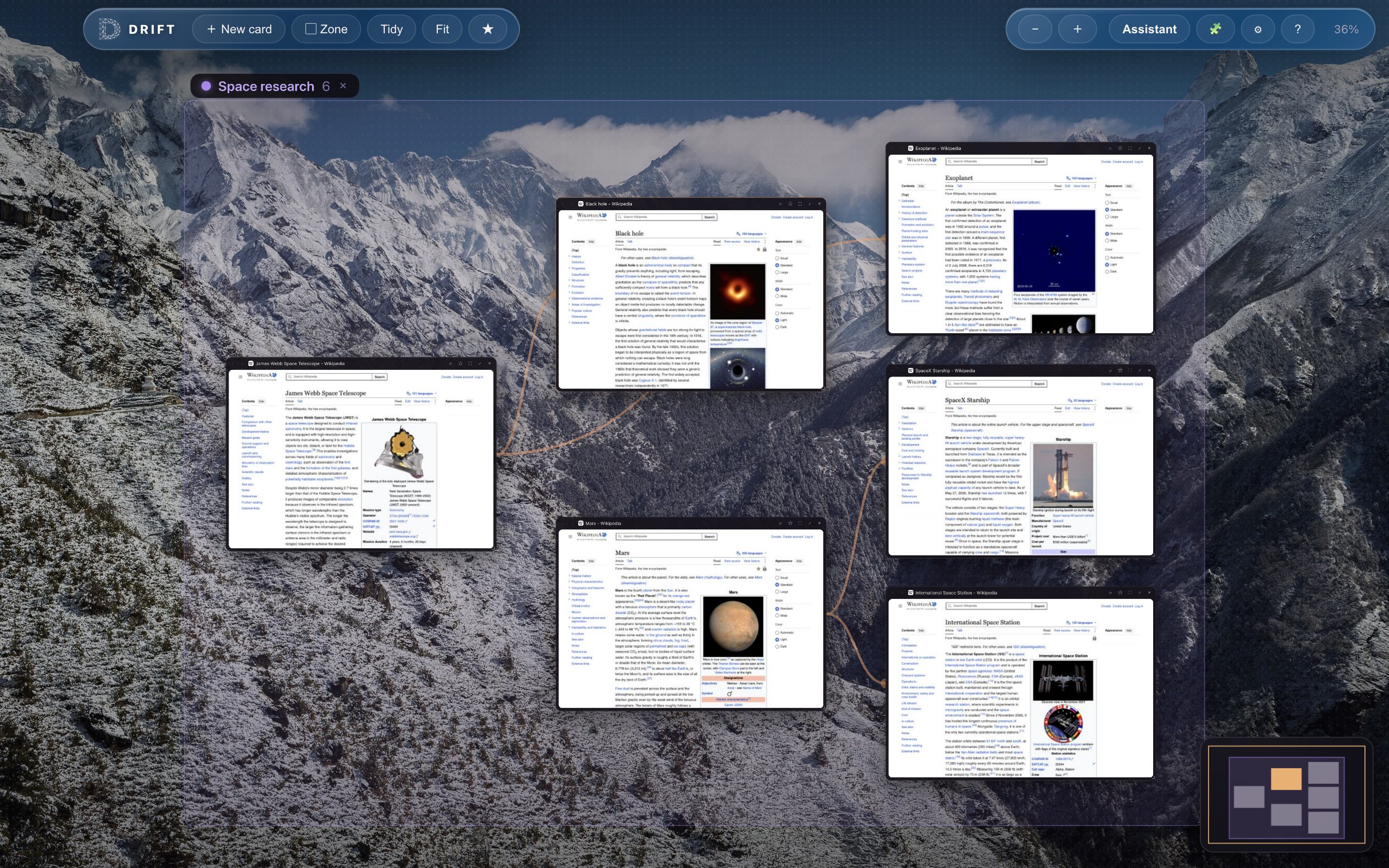
This is what the agent sees: not one URL, but the whole session — live cards and the trails between them.
What Claude Code can actually do
The connector exposes eight tools. They are the same tools Drift's own built-in assistant uses, which means they carry the same safety rules rather than a looser copy of them.
| Tool | What it does | Permission |
|---|---|---|
| list_cards | Every card on the canvas: title, URL, zone, and what connects to what | Read only |
| read_page | A card's readable text plus its interactive elements, so the agent can refer to a specific button or field | Read only |
| screenshot_card | A JPEG of a card, for when layout or an image matters more than text | Read only |
| open_card | Opens a new card, optionally trailed from an existing one | Asks for unfamiliar sites |
| navigate_card | Sends a card to a new URL, or back, forward, or reload | Asks for unfamiliar sites |
| focus_card | Moves the canvas camera so you are looking at a card | None needed |
| click | Clicks an element on a page, as a real trusted browser event | Asks, per site |
| type_text | Types into a field, optionally pressing Enter | Asks, per site |
The safety model
Handing an agent a browser that is signed into your real accounts is not a small thing, so the guard rails are worth stating plainly.
- Reading is free; acting asks. The first time the agent wants to click or type on a site, Drift puts a dialog in front of you naming the site and the action. Allow once, always allow that site, or deny.
- Standing grants stay visible. Every site you have said "always" to is listed in Connections with a Revoke button. A permanent invisible licence would be a trust bug, so there isn't one.
- Credential fields are refused outright. Password, payment-card, and file-upload inputs are blocked even on a site you have allowed. The agent cannot type your password, and it cannot be talked into it.
- Page text is quarantined. Everything read from a page is handed to the model wrapped and labelled as untrusted data, so instructions hidden in a web page are not mistaken for instructions from you.
- Escape is a brake. Pressing Escape on the canvas stops whatever is running and hands the view back to you.
- Nothing is listening until you say so. The connector is off by default, binds to loopback only, requires a bearer token, and refuses requests that carry a web page's origin — so a site you are browsing cannot reach the port.
It runs on your Mac, and it is free
There is no Drift cloud. The MCP server is a few hundred lines running inside the browser you already launched, listening on an address that only your own machine can reach. That means no hosting bill, no account, no API key, no telemetry, and nothing to keep online. Drift itself is free and open source under GPL-3.0, so you can read exactly what the connector does before you enable it.
It also means the connector is only reachable while Drift is running, on the machine it is running on. That is a feature, not a limitation: a browser agent belongs next to the browser.
How it compares
Three common ways to give an AI agent a browser, and what each one actually gets you:
| Drift MCP connector | Headless browser MCP | Browser extension | |
|---|---|---|---|
| Uses your signed-in session | Yes — it is your browser | No, starts logged out | Yes |
| You can watch it work | Yes, on the canvas | No, it is hidden | Yes |
| Works from the terminal | Yes, over MCP | Yes, over MCP | Usually chat-only |
| Per-site consent for clicks | Yes, with revocable grants | Varies; often none | Varies |
| Credential fields blocked | Yes, always | Rarely | Varies |
| Hosting or cost | None — loopback only | None to some | None |
| Whole-session context | The full canvas, with trails | One page at a time | One tab at a time |
Things worth trying first
- "List what's on my canvas and tell me which of these tabs I can close."
- "Read the three API docs pages I have open and write me a client for them."
- "Open the failing CI run and tell me which test broke and why."
- "Screenshot the staging page and compare it against the design card next to it."
- "Fill in the issue form on this page with a repro from the error I just pasted" — Drift will ask you before it types, and it will show you the page while it does.
Frequently asked
What is an MCP server?
MCP, the Model Context Protocol, is an open standard for giving an AI assistant tools it can call. An MCP server is simply a program that answers those calls. Drift's is built into the browser and runs on your own Mac, so there is nothing to host and nothing to pay for.
Does it cost anything, or need a server?
No. The connector runs inside Drift and listens only on 127.0.0.1. No
hosting, no account, no subscription.
How is this different from a headless browser MCP?
A headless MCP launches its own empty browser and fetches a URL from scratch, logged out. Drift's connector works on the pages already open in front of you, in your real signed-in session.
Can Claude Code click things without asking?
No. Reading is free, but clicking and typing ask your permission the first time on each site, and you can revoke a standing grant at any time. Password, payment-card, and file-upload fields are refused outright.
Does it work with MCP clients other than Claude Code?
Yes. The connector speaks standard MCP over streamable HTTP, so any client that can point at an HTTP MCP endpoint with a bearer token can drive Drift.
The honest fine print
Drift is young software, built by one indie developer. It runs on macOS only for now, on both Apple Silicon and Intel, with a Windows build coming. The MCP connector is new: it does what this page describes, and it will grow.
If you want a browser that has been polished for a decade, this is not it. If you want your coding agent to work on the actual web pages in front of you instead of a blank one it opened for itself, that is what this is for. Start with the spatial browsing explainer if the canvas idea is new to you, or see what it looks like without tabs at all.